
How to filter speckle in Sentinel-1 images
On this page
Problem statement
Threshold a single Sentinel-1 image for water and the result is peppered with isolated pixels: dark specks in fields and bright holes in lakes. The cause is speckle, and the obvious fix — a smoothing filter — removes it at the cost of blurring every boundary the analysis is about. The choice of filter decides which of those two problems you end up with.
On the flood scene south of Valencia from 1 November 2024, a raw water mask thresholded at −18 dB breaks into 1,664 separate patches. A 5 × 5 Lee filter cuts that to 544 and keeps the lagoon shore almost as sharp as the unfiltered image — 3.8 dB per pixel at its steepest, against 4.4. A 5 × 5 box average cuts the patches further, to 396, and flattens the same edge to 2.8.
Quick answer
Use an adaptive filter such as Lee, applied to linear intensity, with the equivalent number of looks of the data:
import numpy as np
from scipy.ndimage import uniform_filter

def lee_filter(img, size=5, enl=4.4):
    """Lee filter on linear intensity. Smooths homogeneous areas, keeps edges.
    enl: equivalent number of looks of the input (4.4 for Sentinel-1 IW GRD/RTC)."""
    ok = np.isfinite(img)
    x = np.where(ok, img, 0.0)
    n = uniform_filter(ok.astype("float64"), size)
    mean = uniform_filter(x, size) / np.maximum(n, 1e-9)
    sq = uniform_filter(x * x, size) / np.maximum(n, 1e-9)
    var = np.maximum(sq - mean ** 2, 0)
    noise = (mean ** 2) / enl                    # variance speckle alone would produce
    weight = np.clip((var - noise) / np.maximum(var, 1e-12), 0, 1)
    out = mean + weight * (x - mean)
    return np.where(ok, out, np.nan)
Where local variance is no more than speckle alone would produce, the filter returns the local mean; where it is higher — an edge, a target — it keeps the original pixel.
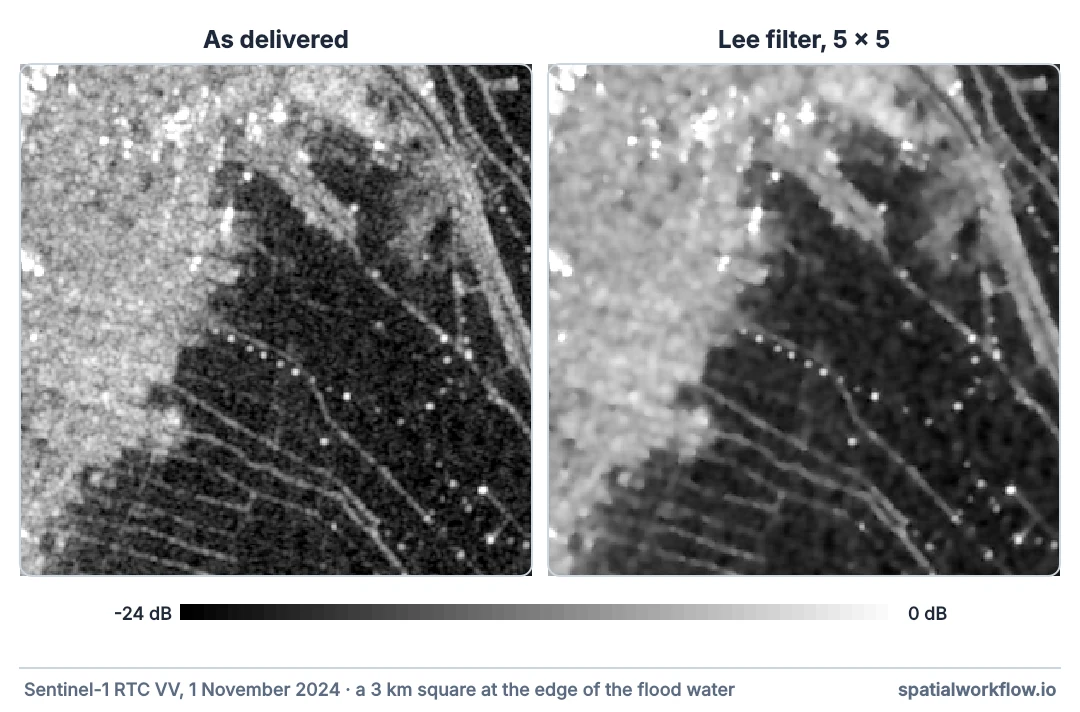
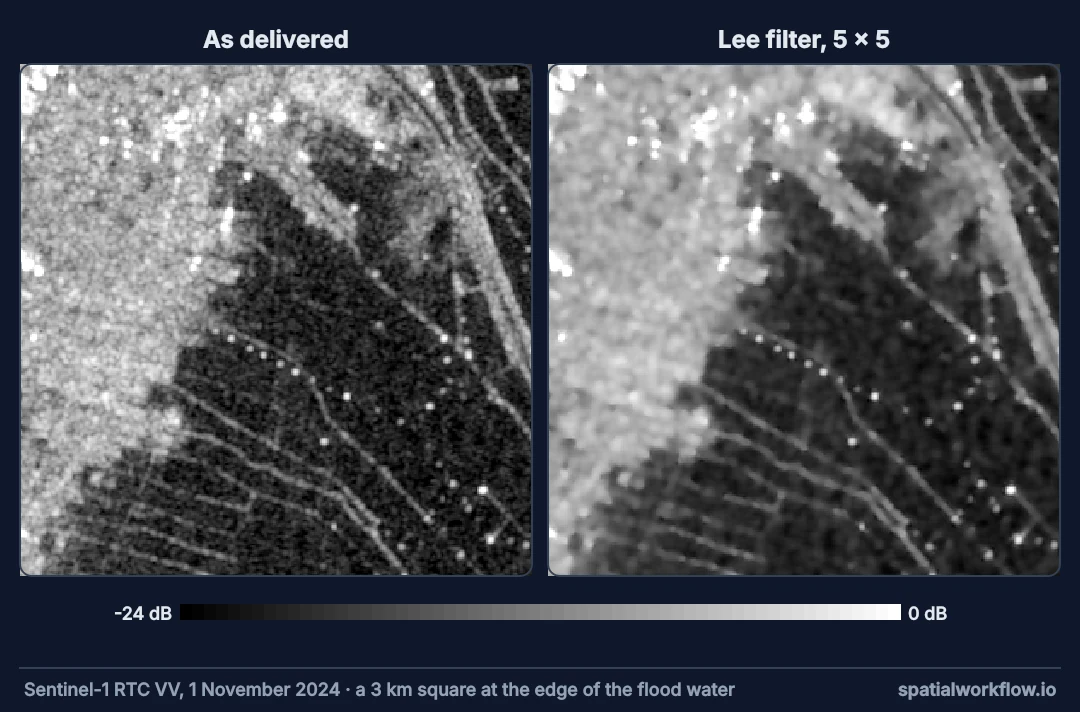
What you get — from The data used on this page
Overwriting sar_io.py
Filter linear intensity with the right number of looks
1. Filter linear intensity
Speckle statistics, and every adaptive filter's assumptions, apply to intensity, not decibels. Convert to dB after filtering.
2. Set the number of looks
The Lee filter needs the speckle variance, which depends on ENL. Sentinel-1 IW RTC has an ENL of about 4.4; the STAC item states it in sar:looks_equivalent_number.
3. Handle missing pixels
A plain filter spreads one NaN over its whole window. Filter with normalised sums that ignore missing pixels, as the function above does.
4. Choose the window
5 × 5 at 10 m is a common compromise. Larger windows smooth more and cost more detail; 7 × 7 suits large water bodies, 3 × 3 suits small ones.
5. Measure the result
Check two numbers: ENL over a homogeneous area, which should rise, and the sharpness of a known edge, which should not fall much. A filter that improves only the first is a blur.
6. Consider time before space
If several dates of the same orbit are available and nothing changed between them, a temporal mean reduces speckle without any spatial blur, as the composite guide shows.
Four filters on the same scene
The data used on this page
Sentinel-1 radiometrically terrain-corrected backscatter (sentinel-1-rtc) from the Microsoft Planetary Computer, read through sar_io.py — the small module from the reading guide that searches, groups frames into passes and mosaics each pass onto a fixed grid.
%%writefile sar_io.py
"""Find, read and mosaic Sentinel-1 RTC scenes from Microsoft Planetary Computer."""
from collections import defaultdict

import numpy as np
import planetary_computer
import pystac_client
import rasterio
from rasterio.enums import Resampling
from rasterio.transform import from_origin
from rasterio.vrt import WarpedVRT
from rasterio.warp import transform_bounds

STAC = "https://planetarycomputer.microsoft.com/api/stac/v1"


def search(bbox, dates, orbit=None, direction=None, collection="sentinel-1-rtc"):
    """Items over bbox (lon/lat) in a date range, filtered by relative orbit and pass direction."""
    cat = pystac_client.Client.open(STAC, modifier=planetary_computer.sign_inplace)
    items = cat.search(collections=[collection], bbox=bbox, datetime=dates).item_collection()
    keep = [i for i in items
            if (orbit is None or i.properties["sat:relative_orbit"] == orbit)
            and (direction is None or i.properties["sat:orbit_state"] == direction)]
    return sorted(keep, key=lambda i: i.datetime)


def passes(items):
    """Group frames into passes: same day, same relative orbit."""
    groups = defaultdict(list)
    for i in items:
        groups[(i.datetime.date(), i.properties["sat:relative_orbit"])].append(i)
    return dict(sorted(groups.items()))


def grid(bbox, crs, res=10):
    """A fixed target grid: every pass is read onto this, so arrays line up."""
    left, bottom, right, top = transform_bounds(4326, crs, *bbox)
    width, height = int((right - left) // res), int((top - bottom) // res)
    return {"crs": crs, "transform": from_origin(left, top, res, res),
            "width": width, "height": height}


def read_pass(frames, band, g):
    """Mosaic one pass's frames for one band onto grid g. Linear power; NaN where no data."""
    out = np.full((g["height"], g["width"]), np.nan, dtype="float32")
    for item in frames:
        with rasterio.open(item.assets[band].href) as src, WarpedVRT(
                src, crs=g["crs"], transform=g["transform"], width=g["width"],
                height=g["height"], resampling=Resampling.bilinear, nodata=np.nan) as vrt:
            a = vrt.read(1)
        a[a <= 0] = np.nan                       # -32768 nodata and zero-padding
        fill = np.isnan(out) & np.isfinite(a)
        out[fill] = a[fill]
    return out


def to_db(linear):
    return 10 * np.log10(linear)
Overwriting sar_io.py
Example 1 — four versions of the same scene
from scipy.ndimage import median_filter
from sar_io import search, passes, grid, read_pass, to_db

bbox = [-0.46, 39.25, -0.33, 39.45]
g = grid(bbox, "EPSG:25830")
vv = read_pass(next(iter(passes(search(bbox, "2024-11-01/2024-11-01", orbit=110)).values())), "vv", g)

def box(img, size=5):
    ok = np.isfinite(img)
    s = uniform_filter(np.where(ok, img, 0.0), size)
    n = uniform_filter(ok.astype("float64"), size)
    return np.where(ok, s / np.maximum(n, 1e-9), np.nan)

versions = {"none": vv, "box 5x5": box(vv), "median 5x5": median_filter(np.nan_to_num(vv), 5),
            "Lee 5x5": lee_filter(vv)}
print({k: f"{np.nanmedian(to_db(v)):.2f} dB" for k, v in versions.items()})
{'none': '-9.13 dB', 'box 5x5': '-8.60 dB', 'median 5x5': '-8.92 dB', 'Lee 5x5': '-8.68 dB'}
Example 2 — speckle reduction and edge sharpness
from pyproj import Transformer

def rc(lon, lat):
    x, y = Transformer.from_crs(4326, g["crs"], always_xy=True).transform(lon, lat)
    c, r = ~g["transform"] * (x, y)
    return int(r), int(c)

r, c = rc(-0.352, 39.333)                             # open water in the Albufera lagoon
edge_row = rc(-0.38, 39.345)[0]                        # a row crossing the lagoon's west shore
for name, v in versions.items():
    p = v[r - 20:r + 20, c - 20:c + 20]
    enl = np.nanmean(p) ** 2 / np.nanvar(p)
    profile = to_db(np.nanmean(v[edge_row - 3:edge_row + 4, :], axis=0))
    steepest = np.nanmax(np.abs(np.diff(profile)))
    print(f"{name:11} ENL {enl:6.1f}   steepest step along the shore profile {steepest:5.1f} dB/pixel")
none ENL 2.0 steepest step along the shore profile 4.4 dB/pixel
box 5x5 ENL 3.8 steepest step along the shore profile 2.8 dB/pixel
median 5x5 ENL 4.5 steepest step along the shore profile 3.2 dB/pixel
Lee 5x5 ENL 3.7 steepest step along the shore profile 3.8 dB/pixel
The ENL of the raw lagoon patch is 2.0 here, not the 4.4 of an ideal homogeneous surface: three days after the flood the lagoon surface was not uniform — wind, floating debris or mixed pixels, the ENL cannot say which. Real texture is exactly what an adaptive filter is designed to leave alone, which is why Lee raises ENL less than the box mean does.
Example 3 — what each filter does to a water mask
from scipy.ndimage import label

for name, v in versions.items():
    water = to_db(v) < -18
    _, n = label(water)
    print(f"{name:11} water {water.mean():6.1%} of the area in {n:6,} separate patches")
none water 21.8% of the area in 1,664 separate patches
box 5x5 water 20.5% of the area in 396 separate patches
median 5x5 water 22.2% of the area in 332 separate patches
Lee 5x5 water 21.4% of the area in 544 separate patches
Adaptive filters against simple averages
Why adaptive filters beat simple averages
A box mean treats every window the same, so it averages water with land at every shoreline and spreads bright targets into their surroundings. The Lee filter compares the local variance with the variance speckle alone would produce. In a homogeneous area the two match, and the filter averages; across an edge the local variance is much larger, and the filter leaves the pixel alone. The result is smooth where smoothing is harmless and sharp where it is not.
Why the median is not a free lunch on SAR
A median filter removes isolated outliers well, which is why it looks good on a water mask. But speckle is multiplicative and asymmetric, the median of a gamma distribution sits below its mean, and median filtering biases backscatter low — visible in Example 1, where the median-filtered scene is 0.24–0.32 dB darker than the box and Lee versions. It also erodes thin features such as channels and roads.
Why ENL must be right
The Lee filter's decision hinges on the speckle variance, mean² / ENL. Set ENL too high and the filter thinks speckle is smaller than it is, treats speckle as edges and smooths too little. Set it too low and it smooths real edges away. The value in the item metadata is the one to use.
Refined filters, bright targets and per-channel filtering
- Refined Lee, Gamma-MAP and Frost filters handle edges and textures better; the principle is the same.
- Bright targets such as ships survive the Lee filter unchanged; that is intended.
- Apply masks after filtering, not before, or edges of the mask become artificial.
- Filter each polarisation separately; VV and VH have different edge structure.
- Downsampling by averaging is itself a speckle filter; do not filter first and then average again without accounting for it.
- Record the filter and window in the output metadata.
Internal links
- Speckle explained — what is being filtered
- How to map floods from Sentinel-1 in Python — where filtering pays off
- A SAR image looks noisy after processing — the fix guide
- How to convert SAR backscatter to decibels — filter in linear, show in dB
- How to make a Sentinel-1 composite over a period — temporal filtering
- How to smooth values over H3 neighbours in Python — the same neighbourhood idea on a grid
FAQ
What is the best speckle filter for Sentinel-1?
For single dates, an adaptive filter such as Lee or Refined Lee with a 5 × 5 window. With several dates of unchanged ground, a temporal mean.
Should I filter in dB or linear?
Linear intensity. Adaptive filters assume it.
What ENL should I use for Sentinel-1?
About 4.4 for IW GRD and RTC; check sar:looks_equivalent_number in the metadata.
Does filtering remove real detail?
Every filter does to some degree. Measure edge sharpness along with smoothness.
Why does my filtered image have holes?
Missing pixels spread through the filter window. Use NaN-aware normalised sums.
Is a median filter good for SAR?
It cleans masks but biases backscatter low and erodes thin features.