
Why Does My FARS Code Break When I Change the Year?
On this page
Problem statement
A script that reads FARS 2023 perfectly fails on 2021 with KeyError: 'STATE', can't find accident.csv in the 2018 zip, or runs on 2019 and silently counts nothing for a column that no longer exists in 2022. FARS is published year by year, and between years the files move, change case, gain a byte-order mark, and lose columns whose information moves to separate files. None of it is announced in the data itself.
This page opens the FARS national files for 2017–2023 side by side, records where the crash file sits in each zip, what its first column is called when read as Latin-1, how many columns it has and which disappear, and builds a reader that handles all seven years.
Quick answer
Find the file by name in any case and folder, decode it as UTF-8 if it is valid and as Latin-1 if not, and upper-case the column names:
def read_fars(year, table="accident", **kw):
    z = zipfile.ZipFile(f"data/FARS{year}NationalCSV.zip")
    name = next(n for n in z.namelist() if n.lower().endswith(f"{table}.csv"))
    raw = z.read(name)
    try:
        text, enc = raw.decode("utf-8-sig"), "utf-8"                    # drops a byte-order mark if there is one
    except UnicodeDecodeError:
        text, enc = raw.decode("latin1"), "latin-1"
    df = pd.read_csv(io.StringIO(text), low_memory=False, **kw).rename(columns=str.upper)
    df.attrs["encoding"] = enc
    return df

for year in YEARS:
    a = read_fars(year, nrows=1)
    print(year, a.attrs["encoding"], "STATE" in a.columns, len(a.columns))
2017 utf-8 True 91
2018 utf-8 True 91
2019 latin-1 True 91
2020 latin-1 True 81
2021 utf-8 True 80
2022 utf-8 True 80
2023 utf-8 True 80
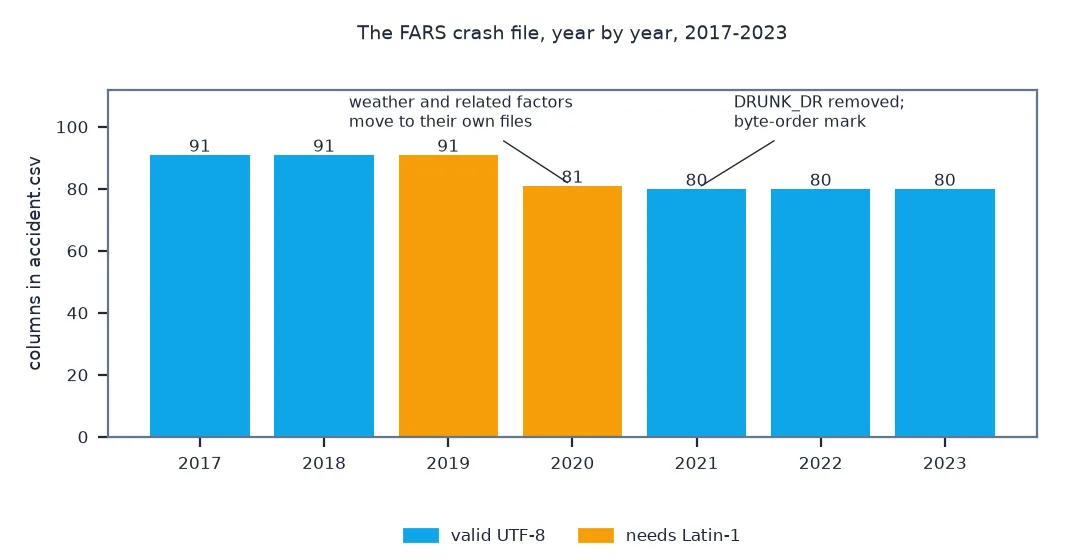
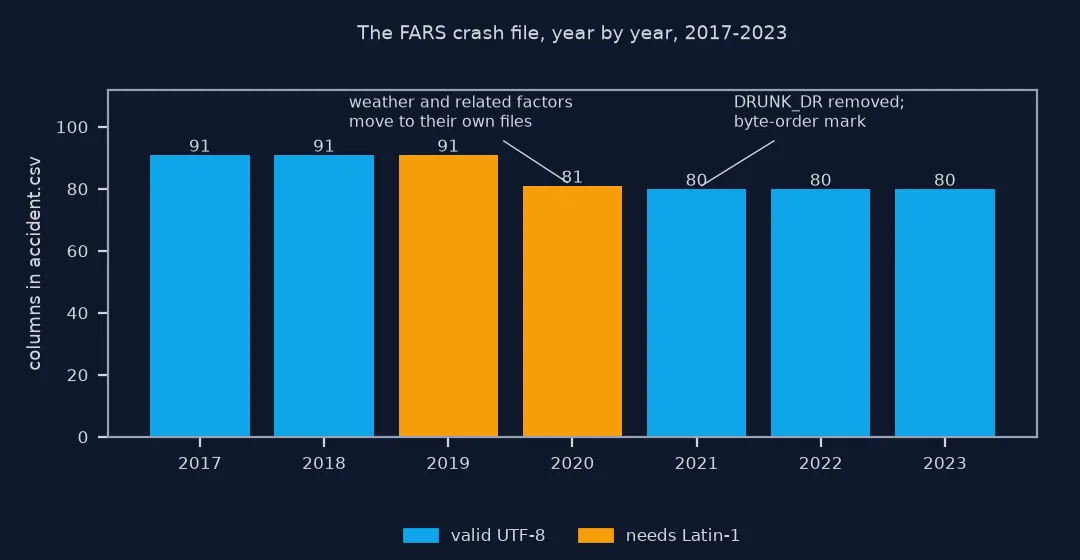
All seven years read, with STATE present each time. Four are valid UTF-8 and two, 2019 and 2020, need Latin-1; the crash file has 91 columns in 2017–2019, 81 in 2020 and 80 since.
How years differ, vanished columns, their new files
1. See how each year differs
Inspect the zip and the raw header for every year:
rows = []
for year in YEARS:
    z = zipfile.ZipFile(f"data/FARS{year}NationalCSV.zip")
    name = next(n for n in z.namelist() if n.lower().endswith("accident.csv"))
    raw = pd.read_csv(z.open(name), encoding="latin1", nrows=1)
    head = z.read(name)
    try:
        head.decode("utf-8"); utf8 = "valid"
    except UnicodeDecodeError:
        utf8 = "invalid"
    rows.append({"year": year, "path in zip": name, "files": sum(1 for n in z.namelist() if n.lower().endswith(".csv")),
                 "UTF-8": utf8, "first column as Latin-1": repr(raw.columns[0]), "columns": len(raw.columns)})
print(pd.DataFrame(rows).to_string(index=False))
year path in zip files UTF-8 first column as Latin-1 columns
2017 accident.CSV 24 valid 'STATE' 91
2018 accident.csv 25 valid 'STATE' 91
2019 accident.CSV 27 invalid 'STATE' 91
2020 FARS2020NationalCSV/accident.csv 33 invalid 'STATE' 81
2021 FARS2021NationalCSV/accident.csv 33 valid 'STATE' 80
2022 FARS2022NationalCSV/accident.csv 33 valid 'STATE' 80
2023 FARS2023NationalCSV/accident.csv 33 valid 'STATE' 80
Three things change at once over seven years: the path, from accident.CSV at the top of the zip to a file inside a folder; the encoding, invalid UTF-8 in 2019 and 2020; and a byte-order mark in 2021 and 2022 that turns STATE into STATE when read as Latin-1.
2. Find the columns that disappeared
cols = {y: set(read_fars(y, nrows=1).columns) for y in YEARS}
for a, b in zip(YEARS[:-1], YEARS[1:]):
    gone, new = sorted(cols[a] - cols[b]), sorted(cols[b] - cols[a])
    if gone or new:
        print(f"{a} -> {b}: removed {gone}; added {new}")
2019 -> 2020: removed ['CF1', 'CF1NAME', 'CF2', 'CF2NAME', 'CF3', 'CF3NAME', 'WEATHER1', 'WEATHER1NAME', 'WEATHER2', 'WEATHER2NAME']; added []
2020 -> 2021: removed ['DRUNK_DR']; added []
Ten columns go in 2020: the crash's related factors CF1 to CF3 and the two weather fields, with their labels. DRUNK_DR goes in 2021. Nothing is added to the crash file in these years.
3. Follow the information to its new file
The crash-level weather and related-factor columns moved into their own files, one row per value, so a crash can have several:
files = lambda y: {n.split("/")[-1].lower() for n in zipfile.ZipFile(f"data/FARS{y}NationalCSV.zip").namelist() if n.lower().endswith(".csv")}
new_files = sorted(files(2020) - files(2019))
print("files new in 2020:", new_files)
w = read_fars(2023, "weather")
print(f"2023 weather.csv: {len(w):,} rows for {w.ST_CASE.nunique():,} crashes; crashes with more than one weather entry: {(w.groupby('ST_CASE').size() > 1).sum():,}")
files new in 2020: ['crashrf.csv', 'driverrf.csv', 'personrf.csv', 'pvehiclesf.csv', 'vehiclesf.csv', 'weather.csv']
2023 weather.csv: 38,193 rows for 37,769 crashes; crashes with more than one weather entry: 414
Six new files arrive in 2020, among them weather.csv and crashrf.csv. In 2023, 414 crashes have more than one weather entry, more than the old pair of columns could always hold, and the new file has no such limit.
A column that silently stops existing
The data used on this page
NHTSA's FARS national CSV files for 2017 to 2023, as published at static.nhtsa.gov.
import io
import zipfile
from pathlib import Path

import pandas as pd
import requests

Path("data").mkdir(exist_ok=True)
YEARS = list(range(2017, 2024))
for year in YEARS:
    f = Path(f"data/FARS{year}NationalCSV.zip")
    if not f.exists():
        f.write_bytes(requests.get(f"https://static.nhtsa.gov/nhtsa/downloads/FARS/{year}/National/FARS{year}NationalCSV.zip", timeout=600).content)
print(f"{len(YEARS)} yearly zips: {', '.join(f'{Path(f'data/FARS{y}NationalCSV.zip').stat().st_size / 1e6:.0f}' for y in YEARS)} MB")
7 yearly zips: 27, 27, 27, 31, 35, 35, 34 MB
Example 1: a column that silently stops existing
DRUNK_DR, the number of drinking drivers in a crash, is in the 2017–2020 files and not after. Code that defaults missing columns to zero would report no drinking drivers from 2021:
for year in YEARS:
    a = read_fars(year, usecols=lambda c: c.upper() in {"ST_CASE", "DRUNK_DR"})
    if "DRUNK_DR" in a:
        print(f"{year}: crashes with a drinking driver {(a.DRUNK_DR > 0).sum():,} of {len(a):,}")
    else:
        print(f"{year}: no DRUNK_DR column; use the person file or the imputed BAC files")
2017: crashes with a drinking driver 9,296 of 34,560
2018: crashes with a drinking driver 8,708 of 33,919
2019: crashes with a drinking driver 8,647 of 33,487
2020: crashes with a drinking driver 9,586 of 35,935
2021: no DRUNK_DR column; use the person file or the imputed BAC files
2022: no DRUNK_DR column; use the person file or the imputed BAC files
2023: no DRUNK_DR column; use the person file or the imputed BAC files
Code that filled the missing column with zeros would report about 9,000 crashes with a drinking driver each year to 2020 and none from 2021.
A long-running system revised over time
FARS is a long-running system that is revised as the data collected changes. Variables are added, retired and moved; files are split when one crash can have several values of something, such as weather; and the packaging of the national files has changed format along the way. Each year comes with an analytical user's manual describing the changes, and reading it before stacking years is the reliable fix. In code, two habits make a reader robust: find files and columns by normalised name rather than exact spelling, and fail loudly when an expected column is missing instead of filling it with a default.
The encoding is the subtlest change. Some years are not valid UTF-8 and need Latin-1; others are UTF-8 and begin with a byte-order mark, three invisible bytes that some tools write first. Read as Latin-1 to suit the first kind, the mark becomes the visible characters "" glued to the first column name, and any accented letters in a UTF-8 year become two wrong characters each. Decoding each file with utf-8-sig first and falling back to Latin-1 handles both.
Encoding, older years and failing loudly
- Encoding: Latin-1 alone reads every year without an error but mangles the byte-order mark and accented letters in the UTF-8 years; decode per file.
- Name columns: the
...NAMEcolumns hold the label for each code; check that the ones you need exist in each year before relying on them. - Years before 2017: check the zip layout again; the national CSVs have been repackaged over time.
- Final and annual report files: the latest year may be replaced by a final version with slightly different counts.
- Fail loudly:
usecolswith a list raises when a column is missing, which is what you want; a callable silently skips it.
Internal links
- How to analyse road death trends with FARS in Python — stacking years
- How to estimate alcohol-impaired road deaths with FARS in Python — the imputed BAC files
- How to measure the effect of the clock change on road crashes in Python — seven years of crash files
FAQ
Why does reading FARS 2021 give KeyError: 'STATE'?
The 2021 and 2022 crash files are UTF-8 with a byte-order mark; read as Latin-1, the first column is named STATE. Decode them with utf-8-sig, falling back to Latin-1 for the years that are not valid UTF-8.
Why can't my code find accident.csv in older FARS zips?
The file is accident.CSV in some years and inside a folder in others; search the zip's file list for a name ending in accident.csv in any case.
What happened to DRUNK_DR in FARS?
It is not in the crash file after 2020; use the person file's alcohol fields or the multiply imputed BAC files instead.
Where did the weather columns go in FARS?
From 2020 the crash-level weather and related-factor columns moved to weather.csv and crashrf.csv, with one row per value.