
Fixing Airbnb Prices Stored as Dollar Strings in Python
On this page
Problem statement
You load an Inside Airbnb listings file, try to average the price column, and it fails because the column is text, or pd.to_numeric(errors="coerce") turns the whole column into missing values. The prices are stored exactly as the website shows them, "$1,234.00", with a currency symbol and a thousands separator. Converting them is a one-line fix, but the quick fixes each have a trap: astype(float) raises, errors="coerce" without cleaning gives all NaN, and a cleaning step that strips too little or too much breaks on other formats.
This page reproduces the errors on the Inside Airbnb snapshot for Washington, D.C. of 24 June 2026, converts the prices correctly, and checks the result: missing prices, the parsing of other currency-formatted columns, and the extreme values the parsing reveals.
Quick answer
Remove the dollar sign and commas, then convert:
L["price_usd"] = pd.to_numeric(L.price.str.replace(r"[$,]", "", regex=True), errors="coerce")
print(f"price as stored: {L.price.dropna().iloc[0]!r} ({L.price.dtype}); converted: {L.price_usd.dropna().iloc[0]} ({L.price_usd.dtype})")
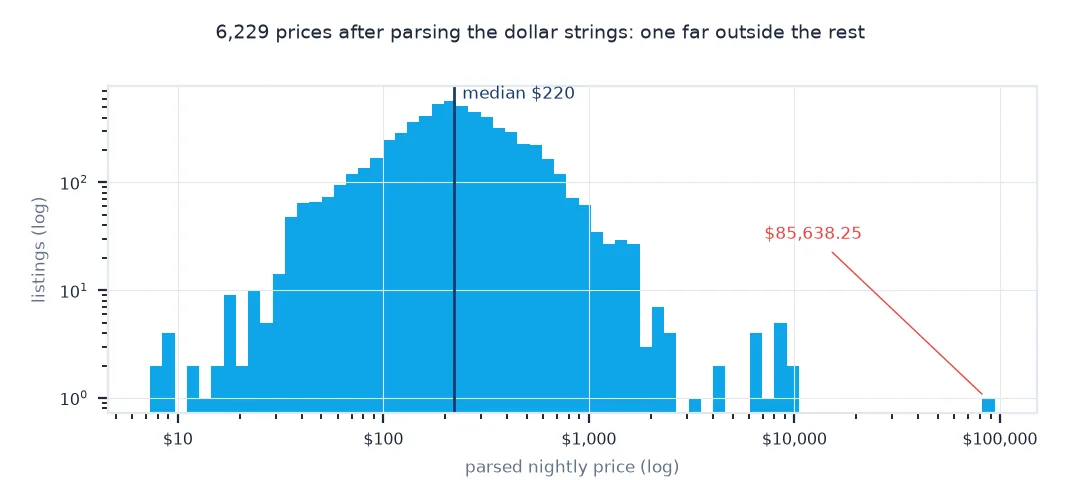
print(f"converted {L.price_usd.notna().sum():,} prices; missing {L.price_usd.isna().sum():,}; median ${L.price_usd.median():.0f}")
price as stored: '$46.81' (str); converted: 46.81 (float64)
converted 6,229 prices; missing 716; median $220
Stripping $ and , converts 6,229 prices; the 716 listings with no price stay missing. The median is $220.
The errors, values to inspect, other price columns
1. The errors
for name, f in (("astype(float)", lambda s: s.astype(float)), ("to_numeric, coerce", lambda s: pd.to_numeric(s, errors="coerce"))):
    try:
        out = f(L.price)
        print(f"{name:>18}: no error, {out.notna().sum():,} numbers of {L.price.notna().sum():,}")
    except Exception as e:
        print(f"{name:>18}: {type(e).__name__}: {str(e)[:70]}")
astype(float): ValueError: could not convert string to float: '$46.81'
to_numeric, coerce: no error, 0 numbers of 6,229
astype(float) stops at the first dollar sign. pd.to_numeric(errors="coerce") raises nothing but returns no numbers at all: all 6,229 prices become missing, which is easy to miss.
2. Values that need a closer look
big = L.loc[L.price_usd >= 10_000, ["price", "room_type", "minimum_nights", "accommodates"]]
print(f"prices of $10,000 or more: {len(big)}")
print(big.sort_values("price", key=lambda s: s.str.replace(r"[$,]", "", regex=True).astype(float), ascending=False).head(3).to_string(index=False))
prices of $10,000 or more: 1
price room_type minimum_nights accommodates
$85,638.25 Entire home/apt 3 7
One listing is priced above $10,000 a night: $85,638.25 for an entire home with a three-night minimum. A value like that is more likely an error or a placeholder than a real nightly rate, and on its own it would move the mean of 6,229 prices by about $14.
3. Other price-like columns
This snapshot also has price_quote_* columns. Check how they are stored before converting:
for c in [c for c in L.columns if c.startswith("price_quote")]:
    v = L[c].dropna()
    print(f"{c:>28}: dtype {L[c].dtype}, non-empty {len(v):,}, example {v.iloc[0] if len(v) else None!r}")
price_quote_checkin_date: dtype str, non-empty 6,456, example '2026-07-05'
price_quote_checkout_date: dtype str, non-empty 6,456, example '2026-08-05'
price_quote_total_price: dtype float64, non-empty 6,229, example np.float64(1450.97)
price_quote_price_per_night: dtype float64, non-empty 6,229, example np.float64(46.81)
price_quote_raw: dtype str, non-empty 6,456, example '{"quote": {"taxes": null, "currency": "USD", "date_match": null, "service_fee": null, "total_price": "1450.97", "cleaning_fee": null, "is_available": true, "discount_amount": "706.30", "price_per_night": "46.80548387096774193548387097", "nightly_subtotal": null, "discounted_subtotal": "1450.97", "raw_price_line_items": [{"amount": "2157.27", "item_type": "other", "description": "Average monthly price", "price_string": "$2,157.27"}, {"amount": "-706.30", "item_type": "discount_amount", "description": "Monthly stay discount", "price_string": "-$706.30"}, {"amount": "1450.97", "item_type": "discounted_subtotal", "description": "Price after discount", "price_string": "$1,450.97"}], "returned_checkin_date": null, "requested_checkin_date": "2026-07-05", "returned_checkout_date": null, "requested_checkout_date": "2026-08-05"}}'
In this snapshot the quote columns are already numeric: price_quote_price_per_night equals price for the first listing ($46.81), and the raw quote shows where it comes from, a monthly price of $2,157.27 less a $706.30 monthly-stay discount, spread over 31 nights. So price here is the nightly rate for the dates quoted, not necessarily the listed nightly price.
A reusable currency parser
The data used on this page
The Inside Airbnb listings file for Washington, D.C. from the snapshot of 24 June 2026 (CC BY 4.0).
from pathlib import Path

import pandas as pd
import requests

Path("data").mkdir(exist_ok=True)
p = Path("data/listings.csv.gz")
if not p.exists():
    r = requests.get("https://data.insideairbnb.com/united-states/dc/washington-dc/2026-06-24/data/listings.csv.gz", timeout=600); r.raise_for_status(); p.write_bytes(r.content)
L = pd.read_csv(p)
print(f"{len(L):,} listings; price column dtype: {L.price.dtype}")
6,945 listings; price column dtype: str
The price column loads as text (str), not as a number.
Example 1: a reusable parser for currency strings
A function that handles symbols, thousands separators and empty values, and reports what it could not parse:
def parse_money(s):
    clean = s.astype("string").str.replace(r"[^\d.\-]", "", regex=True).replace("", pd.NA)
    out = pd.to_numeric(clean, errors="coerce")
    bad = s.notna() & out.isna()
    return out, s[bad].unique()[:5]
vals, unparsed = parse_money(L.price)
print(f"parsed {vals.notna().sum():,}; could not parse: {list(unparsed)}; matches the quick fix: {vals.astype(float).equals(L.price_usd)}")
parsed 6,229; could not parse: []; matches the quick fix: True
The general parser converts the same 6,229 values and finds nothing it cannot parse, and its result is identical to the one-line fix.
Prices stored as displayed
Inside Airbnb stores prices as they appear on Airbnb's pages: a currency symbol, digits with thousands separators, and two decimals. pandas therefore reads the column as text. astype(float) fails on the first dollar sign, and pd.to_numeric(errors="coerce") turns every unparseable string into NaN, which for this column means all of them, silently. Removing the symbol and separators first, then converting, gives proper numbers, and missing prices stay missing.
Parsing is also the moment to look at the values. Once the prices are numbers, the extremes become visible: listings at tens of thousands of dollars a night are rarely real nightly prices. They are placeholders, long-stay totals, or errors, and they would dominate any mean. A parser that reports what it could not convert, together with a look at the largest values, catches both format surprises and data problems. In other cities, prices may carry other currency symbols, which the character-class approach handles as long as the decimal mark is a point.
Decimal commas and nullable types
- Decimal commas: in some locales prices look like
1.234,00; swap separators before converting. - Other columns:
host_response_rateandhost_acceptance_rateare percentages stored as strings such as"98%". - Nullable types: use
"string"dtype so missing values stay<NA>through the replace.
Internal links
- How to analyse Inside Airbnb listings in Python — the rest of the cleaning
- Fixing house price averages skewed by outliers — handling the extreme values
- Inside Airbnb data explained — what the price represents
FAQ
How do I convert Airbnb prices to numbers in pandas?
pd.to_numeric(df.price.str.replace(r"[$,]", "", regex=True), errors="coerce").
Why does pd.to_numeric return NaN for every Airbnb price?
The strings contain $ and ,; errors="coerce" turns every unparseable value into NaN. Remove those characters first.
Why are some Airbnb prices over $10,000?
They are usually placeholders, long-stay totals or errors rather than real nightly prices; inspect and exclude them.
How do I parse percentages like "98%"?
Remove the % sign, convert with pd.to_numeric, and divide by 100.