
Fixing Land Registry Price Paid CSVs That Have No Header
On this page
Problem statement
You read an HM Land Registry Price Paid file with pd.read_csv and get a DataFrame whose column names are a transaction ID, a price and a postcode, and one sale fewer than the file contains. The Price Paid files have no header row. pandas assumes the first row is one, so it turns the first sale into column names, drops it from the data, and every later step that refers to a column by name fails or quietly uses the wrong one.
This page reproduces the problem on the 2024 Price Paid file, then fixes it with explicit column names. It also sets types so the file takes far less memory, and checks that every column holds what its name says.
Quick answer
Pass header=None and the documented column names:
COLS = ["transaction_id", "price", "date", "postcode", "property_type", "old_new", "duration", "paon", "saon",
        "street", "locality", "town", "district", "county", "ppd_category", "record_status"]
P = pd.read_csv(CSV, header=None, names=COLS, parse_dates=["date"])
print(f"rows: {len(P):,}; columns: {list(P.columns[:5])} ...")
print(P[["price", "date", "postcode", "property_type", "ppd_category"]].head(2).to_string(index=False))
rows: 931,453; columns: ['transaction_id', 'price', 'date', 'postcode', 'property_type'] ...
price date postcode property_type ppd_category
405000 2024-09-20 WS13 6US S A
295000 2024-06-14 B79 0EE S A
With header=None and the sixteen names, all 931,453 rows load and the first sale, £405,000 in WS13 6US, is data rather than a header.
Reproduce, set types, check the columns
1. Reproduce the problem
bad = pd.read_csv(CSV, nrows=1000)
print(f"columns pandas invented: {list(bad.columns[:4])}")
print(f"rows read with the default: {sum(1 for _ in open(CSV)) - 1:,} instead of {sum(1 for _ in open(CSV)):,}")
columns pandas invented: ['{25E9DA81-4DB6-555E-E063-4704A8C066F2}', '405000', '2024-09-20 00:00', 'WS13 6US']
rows read with the default: 931,452 instead of 931,453
Read with the default, pandas names the columns after the first sale's transaction ID, price, date and postcode, and the frame has 931,452 rows. No error or warning is raised.
2. Types for speed and memory
t0 = time.perf_counter()
fast = pd.read_csv(CSV, header=None, names=COLS, usecols=["price", "date", "postcode", "property_type", "old_new", "duration", "district", "ppd_category"],
                   dtype={"property_type": "category", "old_new": "category", "duration": "category", "district": "category", "ppd_category": "category"},
                   parse_dates=["date"])
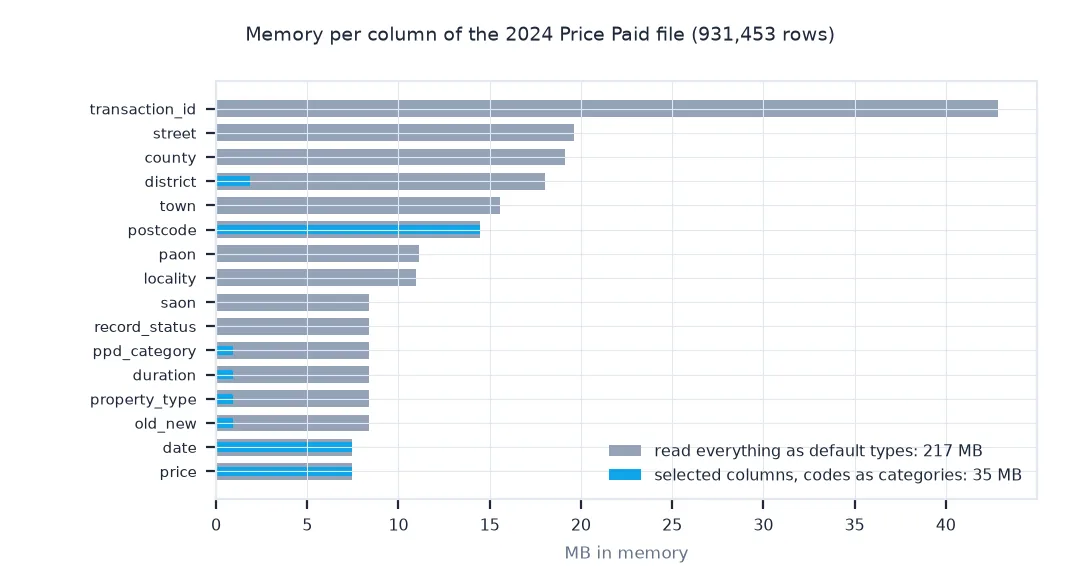
print(f"full read: {P.memory_usage(deep=True).sum() / 1e6:,.0f} MB in memory; selected columns with categories: {fast.memory_usage(deep=True).sum() / 1e6:,.0f} MB")
full read: 217 MB in memory; selected columns with categories: 35 MB
Reading only the needed columns, with the codes as categories, cuts the frame from 217 MB to 35 MB.
3. Check the columns hold what they say
checks = {
    "price is a positive integer": bool((P.price > 0).all()) and P.price.dtype.kind == "i",
    "property_type in D, S, T, F, O": bool(P.property_type.isin(list("DSTFO")).all()),
    "old_new in Y, N": bool(P.old_new.isin(["Y", "N"]).all()),
    "ppd_category in A, B": bool(P.ppd_category.isin(["A", "B"]).all()),
    "dates within 2024": bool(P.date.dt.year.eq(2024).all()),
}
for k, v in checks.items():
    print(f"{k:>33}: {v}")
price is a positive integer: True
property_type in D, S, T, F, O: True
old_new in Y, N: True
ppd_category in A, B: True
dates within 2024: True
Every check passes: prices are positive integers, the codes hold only their documented letters, and all dates fall in 2024. A shifted or missing column would fail at least one of them.
The same file in DuckDB
The data used on this page
HM Land Registry Price Paid Data for 2024, pp-2024.csv (© Crown copyright 2026, Open Government Licence v3.0). The column order is given on the download page.
import time
from pathlib import Path

import pandas as pd
import requests

Path("data").mkdir(exist_ok=True)
CSV = Path("data/pp-2024.csv")
if not CSV.exists():
    r = requests.get("http://prod1.publicdata.landregistry.gov.uk.s3-website-eu-west-1.amazonaws.com/pp-2024.csv", timeout=1800); r.raise_for_status(); CSV.write_bytes(r.content)
with open(CSV) as f:
    print("first line of the file:", f.readline().strip()[:120])
first line of the file: "{25E9DA81-4DB6-555E-E063-4704A8C066F2}","405000","2024-09-20 00:00","WS13 6US","S","N","F","24","","TAYLOR WAY","","LIC
The first line is a sale, quoted field by field, not a list of column names. Nothing in the file says what the sixteen fields are; the order comes from HM Land Registry's documentation.
Example 1: the same file in DuckDB
DuckDB's CSV sniffer also guesses headers. Give it the names explicitly and query the file without loading it into pandas:
import duckdb
cols = ", ".join(f"'{c}': 'VARCHAR'" if c not in ("price",) else f"'{c}': 'BIGINT'" for c in COLS)
spec = "{" + cols + "}"
q = duckdb.sql(f"SELECT count(*) AS sales, median(price) AS median FROM read_csv('{CSV}', header=false, columns={spec}) WHERE ppd_category = 'A'").fetchone()
print(f"DuckDB: {q[0]:,} standard sales, median £{q[1]:,.0f}")
DuckDB: 763,905 standard sales, median £291,000
DuckDB needs the same fix, header = false with explicit names, and returns the same 763,905 standard sales and median of £291,000 as pandas.
A fixed, documented column order
The Price Paid files are published as plain CSV with every field quoted and no header row. The column order is fixed and documented: transaction ID, price, date of transfer, postcode, property type, old/new, duration, PAON, SAON, street, locality, town/city, district, county, PPD category type and record status. pandas, like most CSV readers, assumes a header unless told otherwise, so the first sale becomes the column names and disappears from the data, with no error.
Passing header=None with names= fixes it, and three more options make a large file manageable: usecols to read only the needed columns, dtype="category" for the single-letter codes and repeated names, and parse_dates for the date. Simple checks on the codes then confirm that each column holds what its name says, which catches a wrong column order as well as a missing header.
Change files, quoting and the complete file
- Monthly change files: they have the same columns, with record status A, C or D for added, changed and deleted records.
- Quoted fields: every field is in double quotes; pandas handles this, but other tools may keep the quotes.
- Date with time: dates appear as
2024-01-08 00:00; parse them, or slice the first 10 characters. - The complete file:
pp-complete.csv(several gigabytes) has the same layout; read it in chunks or with DuckDB.
Internal links
- How to analyse HM Land Registry price paid data in Python — after loading
- Price paid data explained — what the columns mean
- How to aggregate millions of points into a grid with DuckDB — DuckDB for large files
FAQ
Why does the Land Registry CSV have no column names?
The Price Paid files are published without a header row; the column order is documented on the download page.
How do I read price paid data with column names in pandas?
pd.read_csv(path, header=None, names=[...16 column names...]).
Why is one sale missing when I read the file?
Without header=None, pandas uses the first sale as the header and drops it from the data.
How do I read the large price paid file faster?
Use usecols for the columns you need, categories for the codes, and DuckDB for the complete file.