
Why Does My GIF Map Animation Have Colour Banding?
On this page
Problem statement
A smooth colour ramp, such as satellite infrared or a temperature field, looks perfect in each PNG frame. Saved as an animated GIF it shows stepped bands where the gradient was smooth, and in some versions the bands shimmer between frames. GIF stores at most 256 colours per frame, so every frame has to be squeezed into a palette, and how that is done decides what the reader sees. This page reproduces the banding on a GOES-16 infrared loop, measures it, and compares the three fixes: dithering, one shared palette, and a different format.
Quick answer
Build one palette from all frames, quantise every frame to it, and decide deliberately whether to dither:
sample = Image.fromarray(np.concatenate([f[::4, ::4] for f in FRAMES]))          # every frame contributes
palette = sample.quantize(colors=256, method=Image.Quantize.MEDIANCUT)
gif_frames = [Image.fromarray(f).quantize(palette=palette, dither=Image.Dither.NONE) for f in FRAMES]
gif_frames[0].save("data/shared.gif", save_all=True, append_images=gif_frames[1:], duration=150, loop=0)
print(f"{len(gif_frames)} frames, one palette, {Path('data/shared.gif').stat().st_size / 1e6:.2f} MB")
24 frames, one palette, 2.44 MB
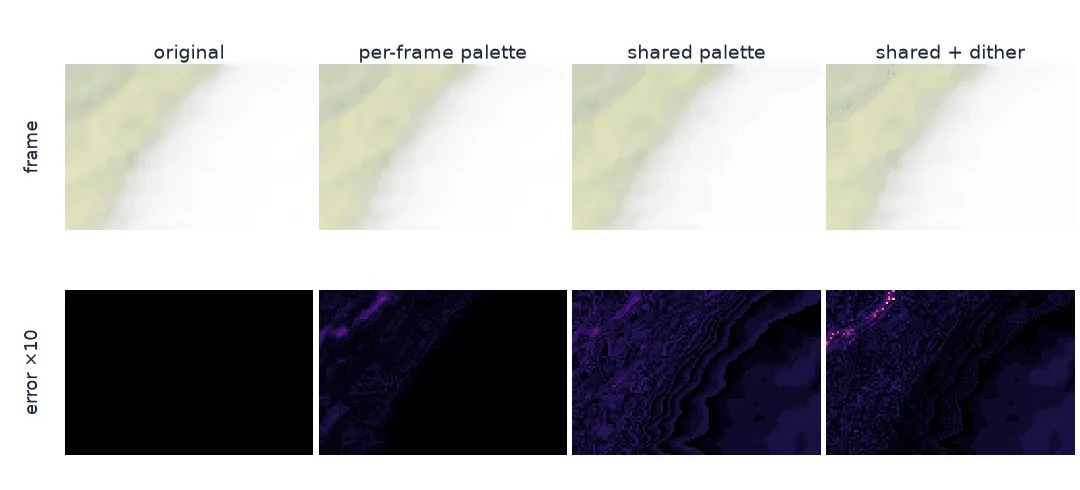
Count colours, measure banding, check for shimmer
1. Count the colours you are asking GIF to keep
A single colour ramp is a path through RGB space, so it can only produce a few hundred distinct colours, and those fit a GIF palette almost exactly. Banding starts when colours combine: cloud blended over a shaded-relief basemap mixes two images into thousands of colours. Count both:
ramp = (plt.get_cmap("viridis")(np.clip((TEMPS[0] - 180) / 140, 0, 1))[..., :3] * 255).astype(np.uint8)
print(f"temperature on a viridis ramp: {len(np.unique(ramp.reshape(-1, 3), axis=0)):,} distinct colours")
for f in FRAMES[:1]:
    print(f"cloud over shaded relief: {len(np.unique(f.reshape(-1, 3), axis=0)):,} distinct colours; GIF allows 256")
print(f"all {len(FRAMES)} frames: {len(np.unique(np.concatenate([f.reshape(-1, 3) for f in FRAMES]), axis=0)):,} distinct colours")
temperature on a viridis ramp: 183 distinct colours
cloud over shaded relief: 9,621 distinct colours; GIF allows 256
all 24 frames: 18,560 distinct colours
2. Measure the banding
Save the frames three ways and read them back: Pillow's default (it picks a palette for each frame), one shared palette without dithering, and a shared palette with dithering. Compare each with the original frames:
def save(path, frames):
    frames[0].save(path, save_all=True, append_images=frames[1:], duration=150, loop=0)
    back = [np.asarray(f.convert("RGB")) for f in ImageSequence.Iterator(Image.open(path))]
    err = np.mean([np.abs(a.astype(int) - b.astype(int)).mean() for a, b in zip(FRAMES, back)])
    return back, Path(path).stat().st_size / 1e6, err

variants = {
    "per-frame palette (Pillow default)": [Image.fromarray(f) for f in FRAMES],
    "shared palette, no dither": gif_frames,
    "shared palette, dithered": [Image.fromarray(f).quantize(palette=palette, dither=Image.Dither.FLOYDSTEINBERG) for f in FRAMES],
}
BACK = {}
for name, frames in variants.items():
    BACK[name], mb, err = save(f"data/{len(BACK)}.gif", frames)
    print(f"{name:35s}: {mb:.2f} MB, mean error {err:.2f} of 255")
per-frame palette (Pillow default) : 3.51 MB, mean error 0.41 of 255
shared palette, no dither : 2.44 MB, mean error 1.54 of 255
shared palette, dithered : 3.39 MB, mean error 1.12 of 255
3. Check for shimmer between frames
The per-frame palette has the smallest error in each frame, because every frame gets 256 colours of its own. That is also its problem in an animation: the band edges fall in different places in each frame, so pixels that did not change can change colour. Measure it on pixels whose brightness temperature moved less than 0.5 K:
for name, back in BACK.items():
    moved = [np.abs(b[1:].astype(int) - b[:-1].astype(int)).sum(axis=-1)[np.abs(np.diff(T, axis=0)) < 0.5].mean()
             for b, T in ((np.stack(back), np.stack(TEMPS)),)][0]
    print(f"{name:35s}: still pixels change by {moved:.2f} (sum of RGB steps) per frame")
orig = np.abs(np.diff(np.stack(FRAMES).astype(int), axis=0)).sum(axis=-1)[np.abs(np.diff(np.stack(TEMPS), axis=0)) < 0.5].mean()
print(f"{'original frames':35s}: {orig:.2f}")
per-frame palette (Pillow default) : still pixels change by 1.42 (sum of RGB steps) per frame
shared palette, no dither : still pixels change by 0.57 (sum of RGB steps) per frame
shared palette, dithered : still pixels change by 2.51 (sum of RGB steps) per frame
original frames : 0.57
The same GOES frames as WebP and MP4
The data used on this page
GOES-16 ABI band 13 (10.3 µm) brightness temperature, CONUS sector, 06:00–11:45 UTC on 8 July 2024 (Hurricane Beryl), from the NOAA GOES archive on AWS, one scan per 15 minutes, cropped to 27–31.5° N, 98–92° W and drawn at twice the satellite resolution as cloud over the Natural Earth shaded relief with water (1:50m), reprojected to the satellite's grid.
import re
from pathlib import Path

import matplotlib
matplotlib.use("Agg")
import matplotlib.pyplot as plt
import numpy as np
import pandas as pd
import requests
import xarray as xr
import rasterio
from PIL import Image, ImageSequence
from rasterio.transform import from_origin
from rasterio.warp import Resampling, reproject
from scipy.ndimage import zoom
from pyproj import Proj

Path("data/goes").mkdir(parents=True, exist_ok=True)
B = "https://noaa-goes16.s3.amazonaws.com/"
keys = []
for h in range(6, 12):
    text = requests.get(B, params={"list-type": 2, "prefix": f"ABI-L2-CMIPC/2024/190/{h:02d}/OR_ABI-L2-CMIPC-M6C13"}, timeout=60).text
    keys += re.findall(r"<Key>([^<]+)</Key>", text)
slot = lambda k: pd.to_datetime(re.search(r"_s(\d{11})", k).group(1), format="%Y%j%H%M").floor("15min")
KEYS = list(pd.Series(keys).groupby([slot(k) for k in keys]).first())


def fetch(key):
    path = Path("data/goes", key.split("/")[-1])
    if not path.exists():
        path.write_bytes(requests.get(B + key, timeout=300).content)
    return path


with xr.open_dataset(fetch(KEYS[0]), engine="h5netcdf") as ds0:
    p = ds0.goes_imager_projection
    x, y = ds0.x.values * p.perspective_point_height, ds0.y.values * p.perspective_point_height
proj = Proj(proj="geos", h=p.perspective_point_height, lon_0=p.longitude_of_projection_origin, sweep=p.sweep_angle_axis,
            a=p.semi_major_axis, b=p.semi_minor_axis)
bx, by = proj([-98, -92, -98, -92], [27, 27, 31.5, 31.5])
IX, IY = (x >= min(bx)) & (x <= max(bx)), (y >= min(by)) & (y <= max(by))
def load(key):
    with xr.open_dataset(fetch(key), engine="h5netcdf") as ds:
        return ds.CMI.values[np.ix_(IY, IX)].astype(float)


TEMPS = [load(k) for k in KEYS]
TEMPS = [zoom(t, 2, order=1) for t in TEMPS]                               # drawn at 2x with bilinear smoothing
TEMPS = [t[: t.shape[0] // 2 * 2, : t.shape[1] // 2 * 2] for t in TEMPS]  # even sizes, for video
H, W = TEMPS[0].shape
res = (x[IX][1] - x[IX][0]) / 2
GRID = from_origin(x[IX].min() - res, y[IY].max() + res, res, res)
RELIEF = Path("data/NE1_50M_SR_W.zip")
if not RELIEF.exists():
    RELIEF.write_bytes(requests.get("https://naciscdn.org/naturalearth/50m/raster/NE1_50M_SR_W.zip", timeout=600).content)
base = np.zeros((3, H, W), np.uint8)
with rasterio.open(f"zip://{RELIEF}!NE1_50M_SR_W/NE1_50M_SR_W.tif") as r:
    for b in range(3):
        reproject(rasterio.band(r, b + 1), base[b], src_crs="EPSG:4326", dst_transform=GRID, dst_crs=proj.crs,
                  resampling=Resampling.bilinear)
BASE = np.moveaxis(base, 0, -1).astype(float)


def render(t):
    """Cloud over shaded relief: colder cloud tops are more opaque and whiter."""
    alpha = np.clip((295 - t) / 75, 0, 1)[..., None]
    cloud = (200 + 55 * np.clip((260 - t) / 60, 0, 1))[..., None]
    return (BASE * (1 - alpha) + cloud * alpha).astype(np.uint8)


FRAMES = [render(t) for t in TEMPS]
print(f"{len(FRAMES)} frames of {FRAMES[0].shape[1]} x {FRAMES[0].shape[0]} px")
24 frames of 610 x 416 px
Example 1: the same frames as WebP and MP4
import imageio
Image.fromarray(FRAMES[0]).save("data/frames.webp", save_all=True, append_images=[Image.fromarray(f) for f in FRAMES[1:]],
                                duration=150, loop=0, lossless=True)
with imageio.get_writer("data/frames.mp4", format="FFMPEG", fps=1000 / 150, codec="libx264", quality=8, macro_block_size=2) as w:
    for f in FRAMES:
        w.append_data(f)
for f in ("data/shared.gif", "data/frames.webp", "data/frames.mp4"):
    print(f"{f:18s}: {Path(f).stat().st_size / 1e6:.2f} MB")
data/shared.gif : 2.44 MB
data/frames.webp : 5.20 MB
data/frames.mp4 : 0.95 MB
What a palette does to a gradient
Banding is what a palette does to a gradient. Cloud thinning out over shaded relief mixes two images into nearly 10,000 colours per frame. The GIF palette offers 256, so neighbouring shades collapse onto the same palette entry and the gradient becomes a staircase; the error map shows its steps as contour lines. Dithering hides the steps by mixing palette colours in a pattern, trading bands for fine noise. Here it cut the mean error from 1.54 to 1.12 but made the file 39% larger, because noise does not compress.
In an animation there is a second problem. If each frame gets its own palette, the steps fall in different places from frame to frame, and pixels whose data did not change jump between palette entries: the bands shimmer. Here, unchanged pixels moved two and a half times as much as in the original frames. One palette built from all frames fixes the steps in place, and unchanged pixels moved exactly as much as in the original. Dithering brings the shimmer back, because the noise pattern is different in every frame. When the frames are genuinely smooth imagery, the better fix may be another format. MP4 stored these frames in 0.95 MB against the shared-palette GIF's 2.44 MB. Lossless WebP keeps every colour but took 5.20 MB.
Classified maps, thin lines and transparency
- Classified maps with a handful of flat colours do not band, and neither does a single colour ramp (183 colours here); GIF is fine for them.
- Text and thin lines add antialiasing colours; a shared palette built from all frames keeps them consistent.
- Palette size below 256 (e.g. 64 colours) shrinks files further and bands more; measure before choosing.
- Transparency uses one palette entry; reserve it explicitly if frames have transparent areas.
- Reading GOES files: in the environment used for this page, xarray's default netCDF4 engine aborted the interpreter at exit after reading these files (
double free or corruption);engine="h5netcdf"with the datasets closed ran cleanly. - Tools differ: gifski and FFmpeg's
palettegen/paletteusemake high-quality shared palettes and are worth trying for long loops.
Internal links
- How to export a map animation — measuring GIF, WebP and video side by side
- Why do the colours flicker in my map animation? — when the colour key itself changes per frame
FAQ
Why does my GIF have colour banding?
GIF can store only 256 colours per frame, so smooth gradients are reduced to steps. Use dithering, a better palette, or a format without the limit (WebP, MP4).
How do I make a GIF with one palette in Python?
Build a palette with Image.quantize() from a sample of all frames, then call frame.quantize(palette=palette) on each frame before saving.
Should I dither my GIF?
Dithering hides bands but adds noise, makes the file larger and makes animations shimmer. For a still image of smooth imagery try it; for animations prefer a shared palette without dithering.
Why do the colours in my GIF shimmer?
Each frame has its own palette, so the colour steps move between frames. Use one shared palette.