
Fixing "Object of type Timestamp is not JSON serializable" in Folium
On this page
Problem statement
Adding a GeoDataFrame to a Folium map with folium.GeoJson(gdf) fails with TypeError: Object of type Timestamp is not JSON serializable as soon as the data has a date or time column. Folium turns the GeoDataFrame into GeoJSON with Python's json module, which knows strings, numbers, lists and dictionaries but not pandas Timestamp objects. The same error appears with datetime.date values, and a related one with Decimal.
This page reproduces the error on the 2024 USGS earthquake catalogue with its event times, shows where it is raised, and compares five fixes: formatting the dates as strings, astype(str), dropping the column, GeoDataFrame.to_json(default=str), and GeoPandas' explore().
Quick answer
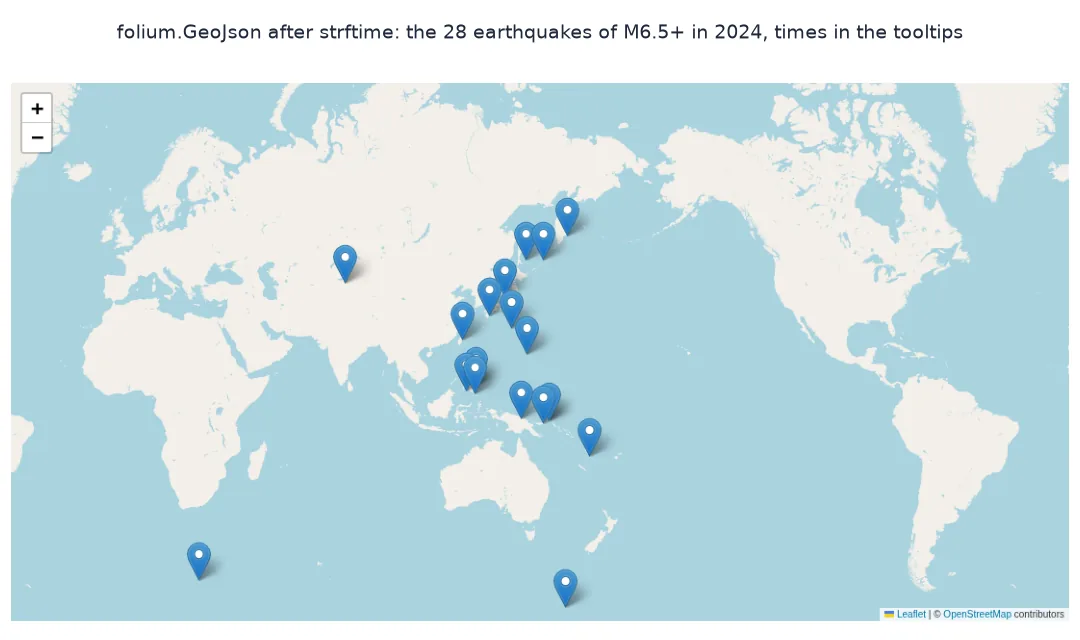
Convert datetime columns to strings before handing the GeoDataFrame to Folium:
g = E.copy()
for col in g.select_dtypes(include=["datetime", "datetimetz"]).columns:
    g[col] = g[col].dt.strftime("%Y-%m-%d %H:%M UTC")
m = folium.Map(location=[20, 150], zoom_start=2)
folium.GeoJson(g, tooltip=folium.GeoJsonTooltip(fields=["place", "mag", "time"])).add_to(m)
m.save("data/quakes_fixed.html")
print(f"converted columns: {list(E.select_dtypes(include=['datetime', 'datetimetz']).columns)}; first time {g.time.iloc[0]}")
converted columns: ['time', 'updated']; first time 2024-01-01 07:10 UTC
Both datetime columns, time and updated, become strings such as 2024-01-01 07:10 UTC, and the layer builds.
Reproduce the error, compare fixes, GeoPandas options
1. Reproduce the error
try:
    folium.GeoJson(E).add_to(folium.Map())
except TypeError as err:
    print(f"TypeError: {err}")
print(f"dtypes of the date columns: {E.time.dtype}, {E.updated.dtype}")
TypeError: Object of type Timestamp is not JSON serializable
dtypes of the date columns: datetime64[us, UTC], datetime64[us, UTC]
Passing the GeoDataFrame directly raises the error. The two columns at fault are the UTC datetimes.
2. Compare the fixes
Each fix makes the GeoJSON serialisable; they differ in what the tooltip shows:
fixes = {
    "strftime": lambda d: d.assign(time=d.time.dt.strftime("%Y-%m-%d %H:%M UTC"), updated=d.updated.dt.strftime("%Y-%m-%d")),
    "astype(str)": lambda d: d.assign(time=d.time.astype(str), updated=d.updated.astype(str)),
    "drop columns": lambda d: d.drop(columns=["time", "updated"]),
}
for name, fix in fixes.items():
    g = fix(E)
    folium.GeoJson(g).add_to(folium.Map())
    print(f"{name:>12}: ok; first time shown as {g.time.iloc[0] if 'time' in g else '(no column)'}")
strftime: ok; first time shown as 2024-01-01 07:10 UTC
astype(str): ok; first time shown as 2024-01-01 07:10:09.476000+00:00
drop columns: ok; first time shown as (no column)
All three fixes build the layer. strftime gives the most readable tooltip, astype(str) the full value with microseconds and offset, 2024-01-01 07:10:09.476000+00:00, and dropping the columns loses the times altogether.
3. GeoPandas: to_json(default=str) and explore()
GeoDataFrame.to_json() calls json.dumps too, so on its own it fails the same way. It passes extra keyword arguments to json.dumps, though, and default=str turns anything json cannot write into its string form. explore() converts datetime columns to strings before building the layer:
try:
    E.to_json()
except TypeError as err:
    print(f"to_json(): TypeError: {err}")
gj = E.to_json(default=str)
folium.GeoJson(gj).add_to(folium.Map())
print(f"to_json(default=str): ok; first time written as {json.loads(gj)['features'][0]['properties']['time']}")
E.explore(tooltip=["place", "mag", "time"]).save("data/quakes_explore.html")
print(f"explore(): ok; HTML {Path('data/quakes_explore.html').stat().st_size / 1e6:.2f} MB")
to_json(): TypeError: Object of type Timestamp is not JSON serializable
to_json(default=str): ok; first time written as 2024-01-01 07:10:09.476000+00:00
explore(): ok; HTML 0.02 MB
On its own, to_json() raises the same error. With default=str it writes the full timestamp string, and explore() builds a 0.02 MB page with the times in the tooltip.
Missing times
The data used on this page
Every earthquake of magnitude 4.5 or more worldwide in 2024 from the USGS FDSN event service, with time and updated parsed as UTC timestamps.
import json
from pathlib import Path

import folium
import geopandas as gpd
import pandas as pd
import requests

Path("data").mkdir(exist_ok=True)
p = Path("data/quakes_m45_2024.csv")
if not p.exists():
    r = requests.get("https://earthquake.usgs.gov/fdsnws/event/1/query", timeout=600,
                     params=dict(format="csv", starttime="2024-01-01", endtime="2025-01-01", minmagnitude=4.5, orderby="time-asc"))
    r.raise_for_status()
    p.write_bytes(r.content)
Q = pd.read_csv(p, parse_dates=["time", "updated"])
Q = Q[Q["type"] == "earthquake"]
big = Q[Q.mag >= 6.5][["time", "updated", "place", "mag", "depth", "longitude", "latitude"]].reset_index(drop=True)
E = gpd.GeoDataFrame(big, geometry=gpd.points_from_xy(big.longitude, big.latitude), crs=4326)
print(f"{len(E)} earthquakes of M6.5+ in 2024; time column dtype {E.time.dtype}")
28 earthquakes of M6.5+ in 2024; time column dtype datetime64[us, UTC]
The 28 earthquakes of magnitude 6.5 or more in 2024 keep their times as datetime64[us, UTC].
Example 1: missing times
NaT, the missing timestamp, behaves differently in each fix. Blank one value and compare:
t = E.time.copy(); t.iloc[0] = pd.NaT
print(f"strftime: {t.dt.strftime('%Y-%m-%d').iloc[0]!r}")
print(f"astype(str): {t.astype(str).iloc[0]!r}")
print(f"to_json(default=str): {json.loads(E.assign(time=t).to_json(default=str))['features'][0]['properties']['time']!r}")
strftime: nan
astype(str): nan
to_json(default=str): None
A missing time comes out as nan from both strftime and astype(str), so the tooltip would show "nan", and as None, a JSON null, from to_json(default=str). Replace missing values with a word such as "unknown" first if the tooltip should say so.
Python's json module has a fixed list of types
Folium serialises layers with Python's standard json module when it renders the page. That module has a fixed list of types it can write, and pandas' Timestamp, Python's datetime and date, NumPy's datetime64 and Decimal are not on it. A GeoDataFrame passed directly to folium.GeoJson is converted through its __geo_interface__, which keeps the values as they are, so the first timestamp it meets raises the TypeError. The error is raised by json.dumps, deep inside Folium's rendering, which is why the traceback rarely mentions the column at fault.
GeoDataFrame.to_json() is a thin wrapper around the same json.dumps call, so it fails in the same way, but it forwards keyword arguments, and default=str gives json a fallback for every type it does not know. GeoPandas' explore() coerces datetime and object columns to strings before it builds the layer, which is why it never meets the error. Converting the columns yourself with strftime gives the most control over what the tooltip shows. Whichever fix is used, check the missing values, because the fixes do not all write them the same way.
Which columns, time zones and popups
- Which columns:
gdf.select_dtypes(include=["datetime", "datetimetz"])finds datetime columns;objectcolumns can also holddateorDecimalvalues, so checktype(gdf[col].iloc[0])for those. - Time zones:
strftimeuses each value's own zone; convert first withdt.tz_convertif the map should show local time. - Popups: an f-string such as
f"{row.time}"formats the timestamp itself and never raises the error. - Other libraries: Plotly and pydeck serialise timestamps themselves; the error is specific to code paths using
json.dumps.
Internal links
- How to make an interactive map with GeoPandas explore() — the route that avoids the error
- How to make a Folium choropleth with tooltips in Python — tooltips from properties
- Fixing USGS earthquake times that show up as 1970 — the timestamps themselves
FAQ
How do I fix "Object of type Timestamp is not JSON serializable" in Folium?
Convert datetime columns to strings with dt.strftime(...) or astype(str), or pass gdf.to_json(default=str) to folium.GeoJson instead of the GeoDataFrame.
Why does folium.GeoJson fail on dates?
Folium writes the layer with Python's json module, which cannot serialise pandas Timestamp objects.
Does gdf.explore() have the same problem?
No; explore() converts datetime and object columns to strings before building the layer.
How do I show a nicely formatted date in a Folium tooltip?
Format the column with dt.strftime("%Y-%m-%d %H:%M") before creating the layer.